Game controls
Jump to navigation
Jump to search
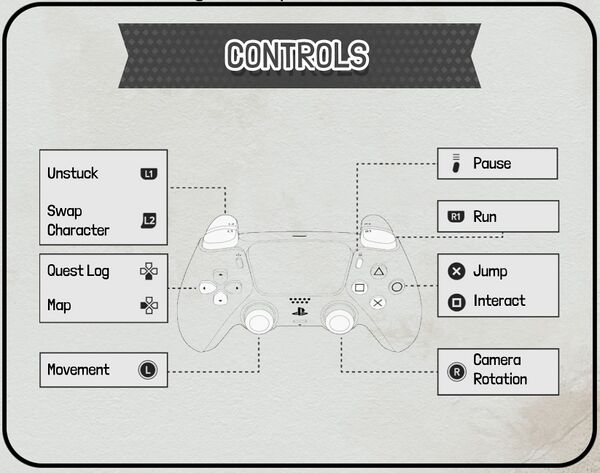
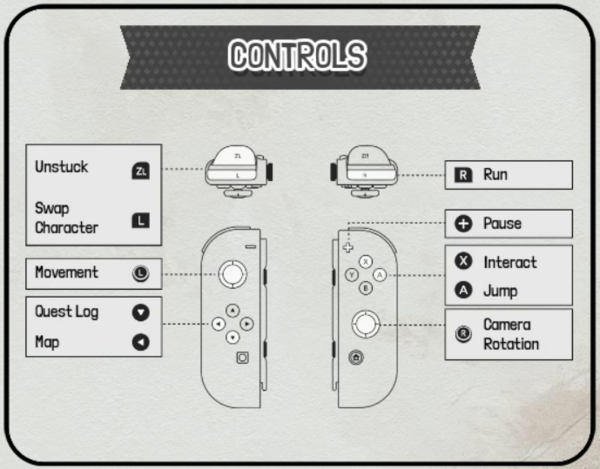
All controls for controller and switch are listed here. Gamepad and key bindings can be changed in-game via the settings menu.

| Left Analog Stick | Walk |
| Right Analog Stick | Camera Look |
| Left Directional Button | Map (Shortcut) |
| Down Directional Button | Quest Journal (Shortcut) |
| Square □ | Interact / Pick up / Action 1 |
| Triangle △ | Action 2 |
| Circle ○ | Go Back / Drop Item |
| Cross X | Jump / Confirm |
| Options | Pause |
| L1 | Switch Character (Single-player only) |
| L2 | Reset Location / Teleport to Twin / Unstuck |
| R1 | Run |

| Left Analog Stick | Walk |
| Right Analog Stick | Camera Look |
| Left Directional Button | Map (Shortcut) |
| Down Directional Button | Quest Journal (Shortcut) |
| X | Interact / Pick up / Action 1 |
| Y | Action 2 |
| B | Go Back / Drop Item |
| A | Jump / Confirm |
| + | Pause |
| L | Switch Character (Single-player only) |
| ZL | Reset Location / Teleport to Win |
| R | Run |